

Customer Statement Summary
See who owes what at a glance — one row per customer with invoiced, paid, credits and outstanding balance — then drill into any customer's full Statement of Account.
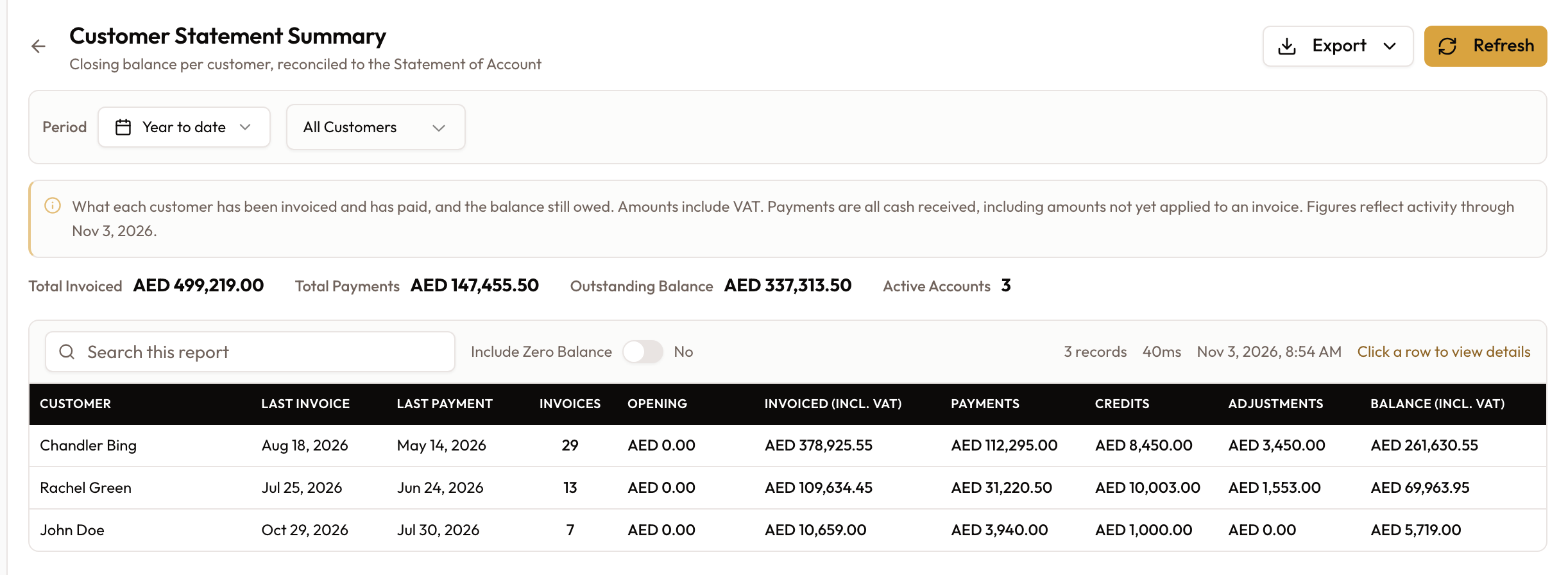
The Customer Statement Summary is the who-owes-what overview: one row per customer showing what they've been invoiced and paid and the balance still owed, across the whole book. Each row's closing balance is the same figure that customer's Statement of Account arrives at — and you can drill from a row straight into that statement. It's a financial report, free on the Starter plan and up.
Read the book at a glance
Open the report
In the Reports area, open the Customer Statement Summary report — "Closing balance per customer, reconciled to the Statement of Account."
Filter
Set the date range, narrow by Customer Type (All Customers, Individual, or Company), and decide whether to show settled accounts: Include Zero Balance is off by default, so customers who owe nothing are hidden. A comparison mode is also available, to compare two periods.
Read the summary
One row per customer — Customer, Invoices, Opening, Invoiced (incl. VAT), Payments, Credits, Adjustments, Balance (incl. VAT), and Last Invoice / Last Payment. Sort by Balance (incl. VAT) to bring the biggest debtors to the top. The totals show Total Invoiced, Total Payments, Outstanding Balance, and Active Accounts (how many customers carry a balance).
Drill into a customer
Click a customer's row to open their full Statement of Account — the transaction detail behind the summary figure. The summary tells you who owes; the statement tells you why.
Export or email it
Use the Export menu: PDF, Excel, or Email (add Recipients and click Send Report).
Missing a customer? Include Zero Balance is off by default, so anyone at a zero balance is hidden — turn it on to see them. And the figures are for the selected period, reconciled to each customer's Statement of Account.
What to read next
Collection Summary Report — payments received by period and method — is documented in its own guide.
Vendor Statement of Account
Run a vendor's Statement of Account — the accounts-payable mirror: bills as debits, payments as credits, and a running balance of what you owe the vendor — then export or email it.
Collections Register
Every payment received in a period, at transaction level — rolled up by customer, agreement, vehicle, day or method, with total collected, receipt count and a per-group collection rate.