

Collections Register
Every payment received in a period, at transaction level — rolled up by customer, agreement, vehicle, day or method, with total collected, receipt count and a per-group collection rate.
The Collections Register lists every payment received in a period at transaction level, and rolls it up by customer, agreement, vehicle, day or payment method. It answers "how much did we collect, from whom, and how" — with a total collected, a receipt count, and a collection rate for the groupings that have one. It's a management report, free on the Starter plan and up.
Run the register
Open the report
In the Reports area, open the Collections Register report — "Every payment received in the period, at transaction level, with rollups by customer, agreement, vehicle, day or method."
Filter and group
Set the date range; filter by Payment Method (All Methods, Cash, Cheque, Bank Transfer, Card, Stripe); and choose a Group By — Transaction detail (every receipt, the default), Customer, Agreement, Vehicle, Day, or Payment Method. A comparison mode compares two periods.
Read the transaction detail
With no grouping, one row per receipt — Date, Type (Payment, On account, or Credit note), Receipt #, Method, Customer / Agreement # / Vehicle / Invoice #, Amount, and Deposit.
Credit notes are listed, not counted as cash. A Credit note row shows where a credit settled an invoice, but it isn't money received — it's kept out of the collected-cash total.
Or read a grouped view
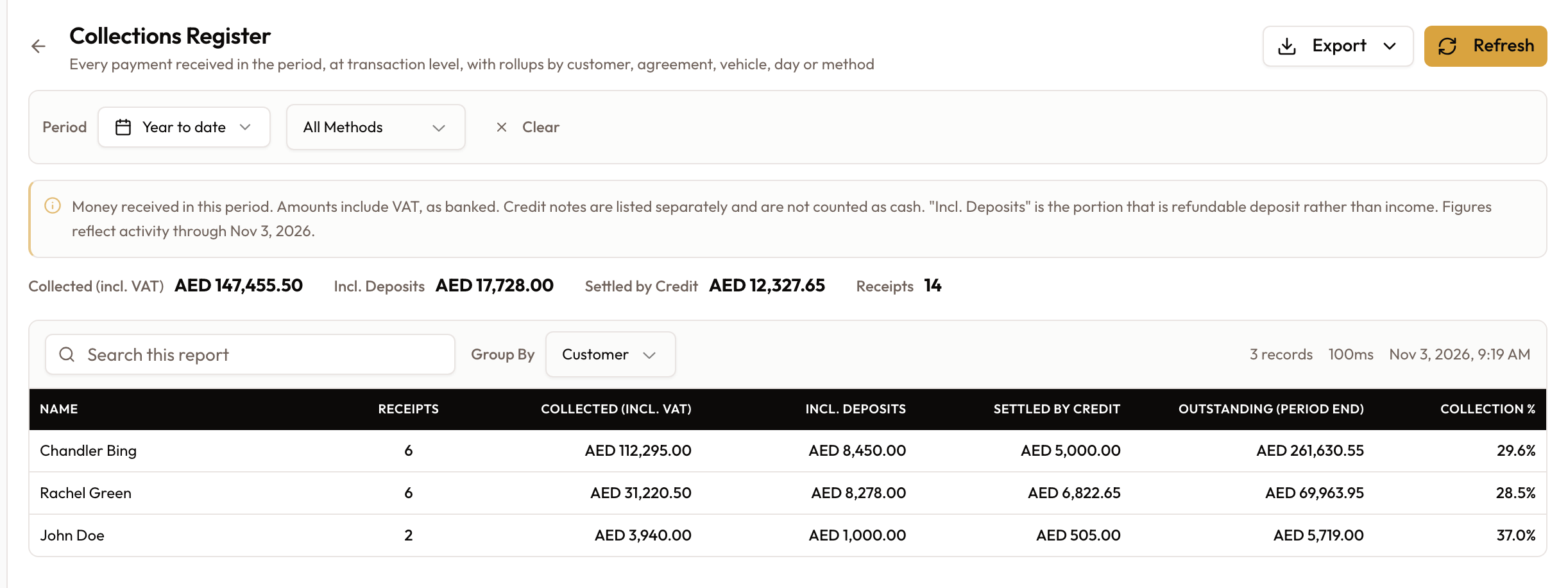
Group the register and each row becomes one group — Name, Receipts, Collected (incl. VAT), Incl. Deposits, Settled by Credit, and (for Customer / Agreement groupings only) Outstanding (period end) and Collection %.
Collection % appears only where "owed" is meaningful. Grouping by Customer or Agreement shows Outstanding and Collection %; grouping by Day, Vehicle or Payment Method does not — a day or a method has no receivable balance, so those columns are left off rather than shown as a misleading 0%.
Totals and export
The totals show Collected (incl. VAT), Incl. Deposits, Settled by Credit, and Receipts — there is deliberately no single overall collection rate (a meaningful rate needs a matching "billed" figure, which only the customer/agreement groupings carry). Export with the Export menu: PDF, Excel, or Email (add Recipients, then Send Report).
What to read next
Customer Statement Summary
See who owes what at a glance — one row per customer with invoiced, paid, credits and outstanding balance — then drill into any customer's full Statement of Account.
Tolls & Fines
Importing Salik, Darb and RTA charges, matching them to the vehicle and renter, and rebilling them.