

Vehicle Disposal & Write-Off
Take a vehicle out of the fleet — out of service, sold, or written off — from its detail page
Every vehicle eventually leaves the fleet. In SpectroNova Express you do that from the vehicle's detail page, and there are three ways out plus a way back: Mark Out of Service (a reversible pause), Mark as Sold and Write Off (permanent disposals), and Return to Service to undo the pause. These lifecycle actions are the only sanctioned way to move a vehicle in or out of the fleet.
Before you start:
- The vehicle must be Available (or already Out of Service). If it's on rent or in maintenance, finish that first; once it's back to Available, the lifecycle actions appear.
- Mark Out of Service / Return to Service need the vehicles: update permission; Mark as Sold / Write Off need vehicles: delete. The menu only shows what your status and permissions allow.
Open the vehicle's actions menu
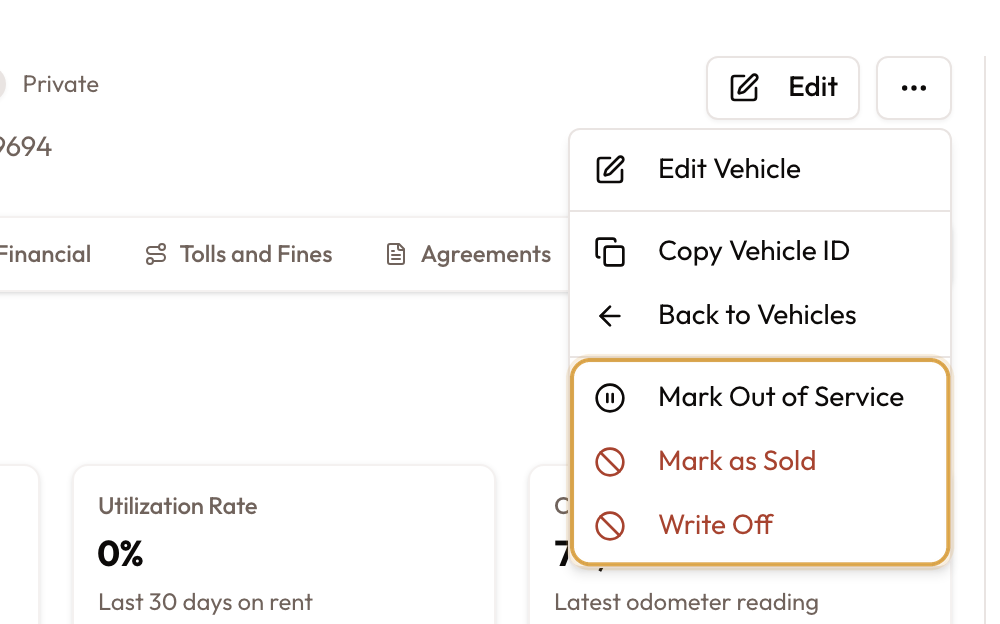
Open the vehicle's detail page and open the actions (⋯) menu, top right. Toward the bottom are the fleet-lifecycle actions for this vehicle's current status; the permanent ones — Mark as Sold and Write Off — are shown in red.
An Available vehicle offers Mark Out of Service, Mark as Sold, and Write Off. An Out of Service vehicle offers Return to Service, Mark as Sold, and Write Off. A vehicle on rent or in maintenance shows them again once it's back to Available.
Choose an action and confirm
Pick the action; a confirmation dialog opens, worded for that action. Read it and click the action button to proceed, or Cancel.
| Action | What the confirmation says | Result |
|---|---|---|
| Mark Out of Service | "The vehicle stays in your fleet but cannot be rented, and is hidden from the public booking site. You can return it to service at any time." | Status → Out of Service (reversible) |
| Return to Service | "The vehicle becomes available to rent again. It stays hidden from the public booking site until you publish it again." | Status → Available |
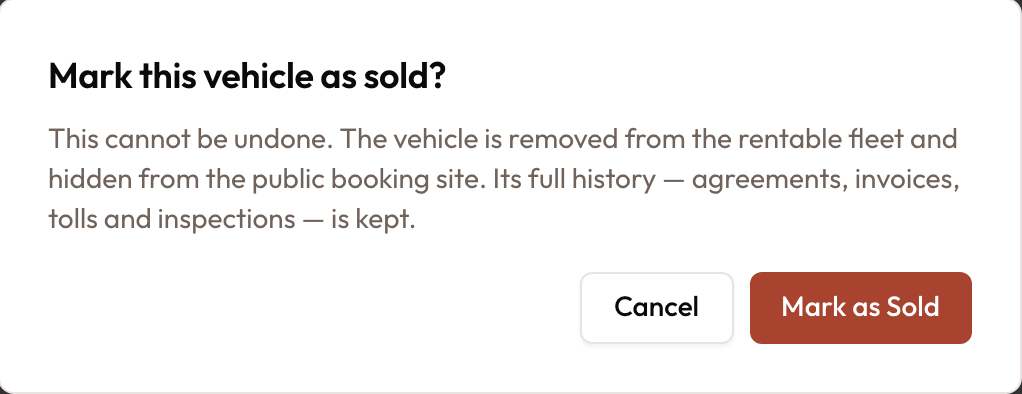
| Mark as Sold | "This cannot be undone. The vehicle is removed from the rentable fleet and hidden from the public booking site. Its full history — agreements, invoices, tolls and inspections — is kept." | Status → Sold (permanent) |
| Write Off | "This cannot be undone. …Its full history … is kept." | Status → Write Off (permanent) |
A success message confirms it — "Vehicle marked out of service", "…returned to service", "…marked as sold", or "…written off" — and the status updates.
A sold or written-off vehicle leaves the fleet calendar and the public booking site, but its record and history remain for reporting.
Common mistakes and edge cases
- When the lifecycle actions appear. They show on a vehicle that is Available or Out of Service. If it's rented, in maintenance or reserved, end that activity first.
- Sold and Write Off are permanent. For a temporary pause, use Mark Out of Service instead; Return to Service brings it back.
- The history stays. Disposal removes the vehicle from the rentable fleet; its full history (agreements, invoices, tolls, inspections) is kept, so past reports stay intact.
- Still hidden after Return to Service. A returned vehicle can be rented again but stays off the public booking site until you publish it there again.
- Who sees the disposal actions. Sold and Write Off appear for users with the vehicles: delete permission.
Related
- Adding Vehicles to Your Fleet — the start of a vehicle's life in the fleet; this guide is the end of it.
- Fleet Calendar & Availability — disposed vehicles drop off the availability timeline.