

Invoice Types & Automated Generation
Where every invoice in SpectroNova Express comes from: the payment schedule on a monthly agreement, Bill rental on a short-term rental, or an invoice you create yourself. Also covers the invoice types, the statuses an invoice moves through, and what voiding gives back.
Most invoices in SpectroNova Express are not typed by hand. They come from one of three places:
- Monthly agreements are billed from the Payment Schedule, one row at a time, in order.
- Short-term rentals are billed from the Rental Account with Bill rental: everything unbilled goes on one invoice.
- Manual and addon invoices are the ones you create yourself.
Which path an agreement uses depends on its billing frequency (short-term vs long-term):
- Single Invoice (short-term): rentals priced at an hourly, daily or weekly rate, Express walk-up rentals, and bookings from your public booking site.
- Monthly (long-term): leases, and rentals priced at the monthly rate.
Permission. Generating, billing and creating invoices all need permission to create invoices. If you don't see Generate, Bill rental or Create Invoice, ask your workspace admin.
The invoice types
Every invoice carries a type that records where it came from. It is set automatically. You never choose it.
| Type | Where it comes from |
|---|---|
| Scheduled | Rental periods being billed: a payment schedule row is generated, or a short-term rental is billed with Bill rental and at least one rental period is on the invoice |
| Security Deposit | Checkout, whenever the agreement has a deposit to invoice, whether or not invoices are raised automatically. Not raised for a Waived or Pre-Auth deposit |
| Extension | An agreement is extended with Raise invoices automatically on. With it off, a monthly agreement's extension row gets this type when you generate it later |
| Addon | You add an ad-hoc charge with Create Addon Invoice (damage, late fees, extra services). A Bill rental invoice with only tolls, fines or items on it is an addon too |
| Manual | You create a standalone invoice from the invoice list |
You may also see Addon Adjustment or Vehicle Swap Adjustment in the type list or on older invoices. Nothing you do in SpectroNova Express raises these today. A vehicle swap does not raise an invoice of its own.
Raise invoices automatically
The Raise invoices automatically setting (Settings → Billing, on the Billing Settings page) decides what happens at handover and when an agreement is extended:
- On: checkout bills the first period straight away, and every extension bills its own period.
- Off: handover and extensions only add the period, unbilled. You bill it from the agreement when you are ready.
Either way, the security deposit invoice is raised at checkout, and later periods are never raised automatically.
Generate an invoice from the payment schedule
On a monthly agreement, invoices come off the Payment Schedule, one row at a time and in order. The full schedule is covered in Viewing Agreement Details & Timeline, and month-by-month billing in the long-term rental workflow.
Find the next row
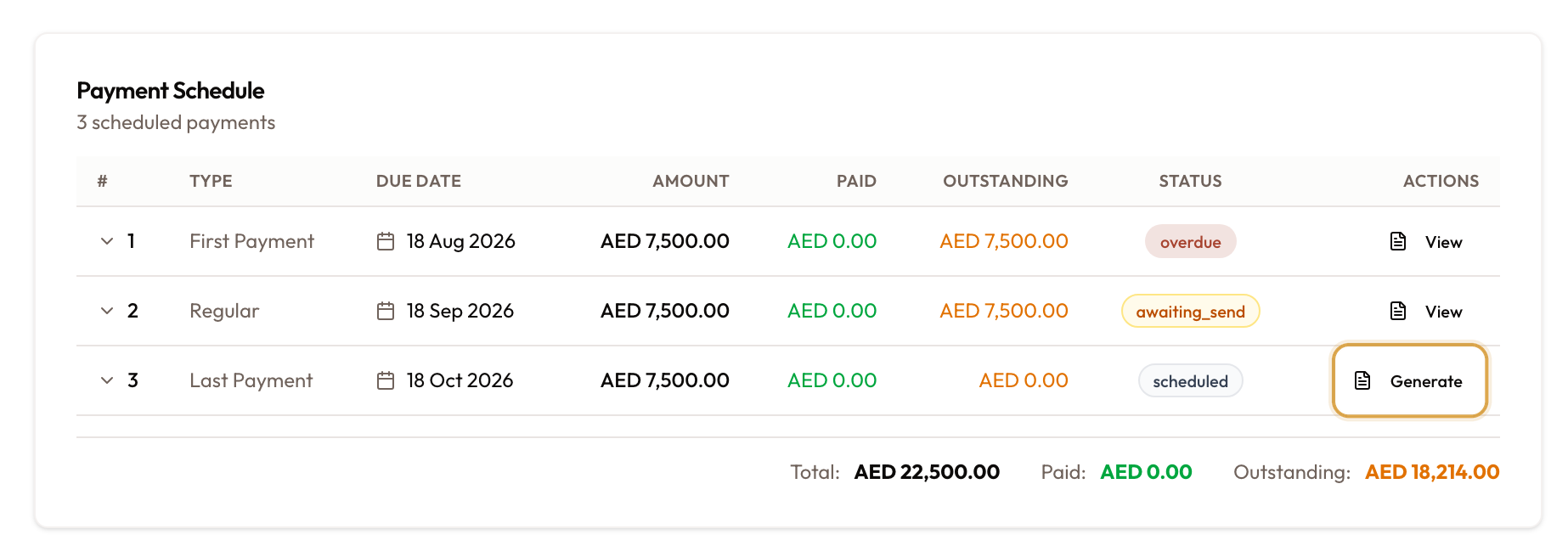
Open the agreement and scroll to the Payment Schedule card. Only the earliest ungenerated row has an active Generate button. Later rows are greyed out with the tooltip "Generate the previous payment first".
On a closed, terminated, cancelled or void agreement, Generate is hidden.
Confirm in the dialog
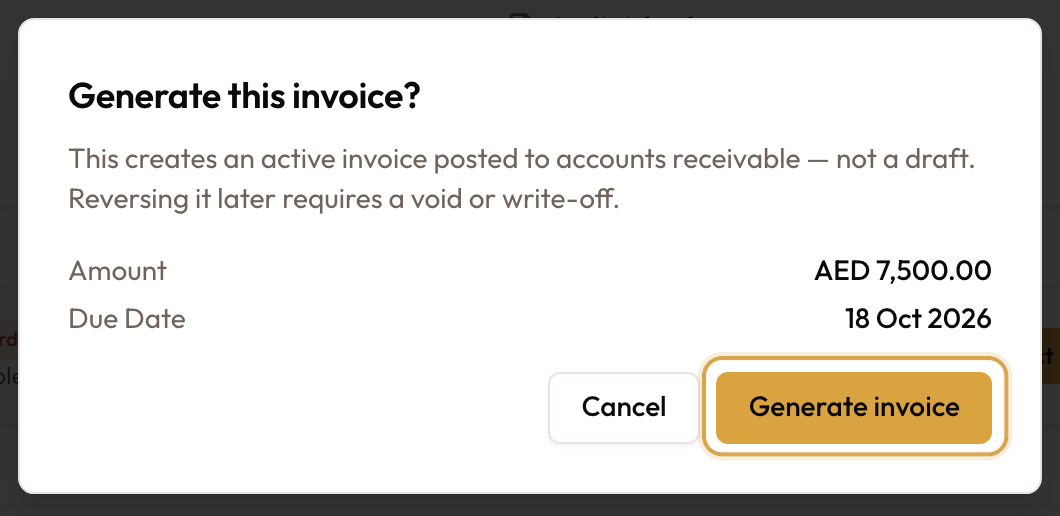
Click Generate. The Generate this invoice? dialog shows the row's amount and due date, and warns: "This creates an active invoice posted to accounts receivable — not a draft. Reversing it later requires a void or write-off."
Generate it
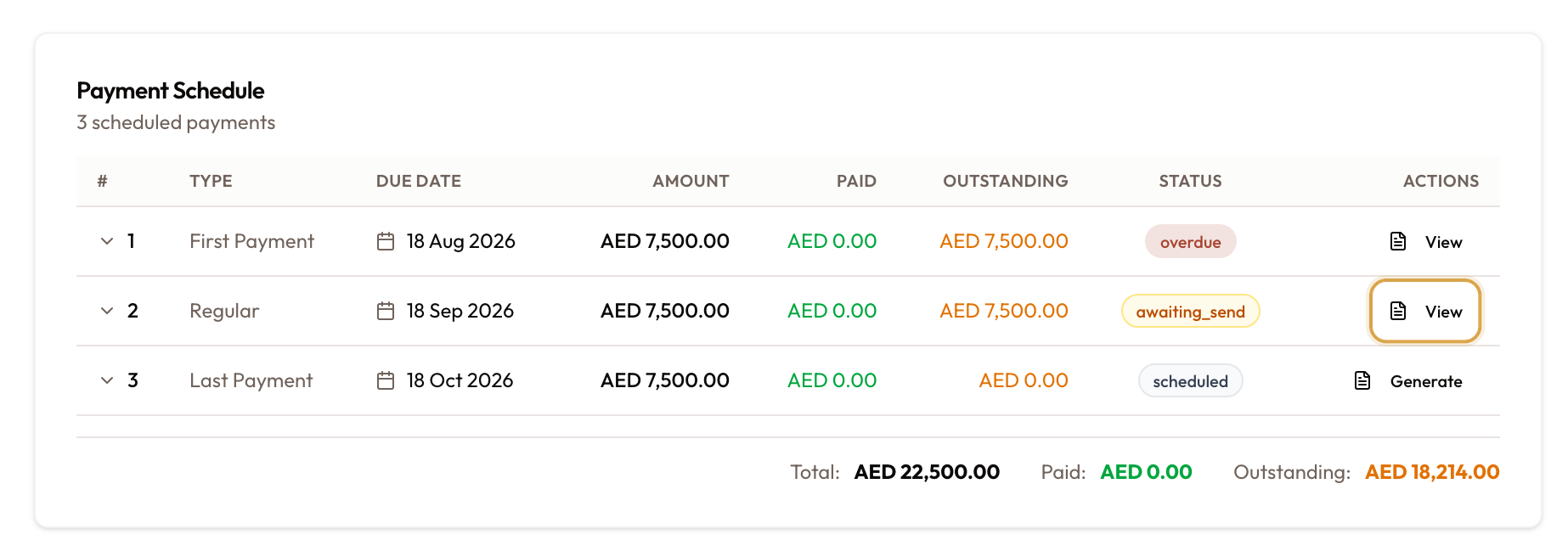
Click Generate invoice. You see "Invoice generated successfully!", and the row now shows View instead of Generate. Click View to open the invoice.
The invoice skips Draft. It starts at Awaiting Send and is not emailed, so send it when you are ready.
Generating is not a draft step. It creates an active invoice that counts as money owed. Undoing it means a void or a write-off.
If the agreement was extended, an extension separator row (calendar icon) divides the original periods from the extension periods. Extension rows generate Extension invoices.
Bill a short-term rental
A short-term rental has no Payment Schedule card. Its Overview tab opens on the Rental Account, which lists everything the rental has run up that is not on an invoice yet:
- rental and extension periods
- tolls, fines and parking, with any processing fee (billing tolls and fines)
- items added by hand
The short-term rental workflow shows where this fits in a rental from start to finish.
Check what is waiting
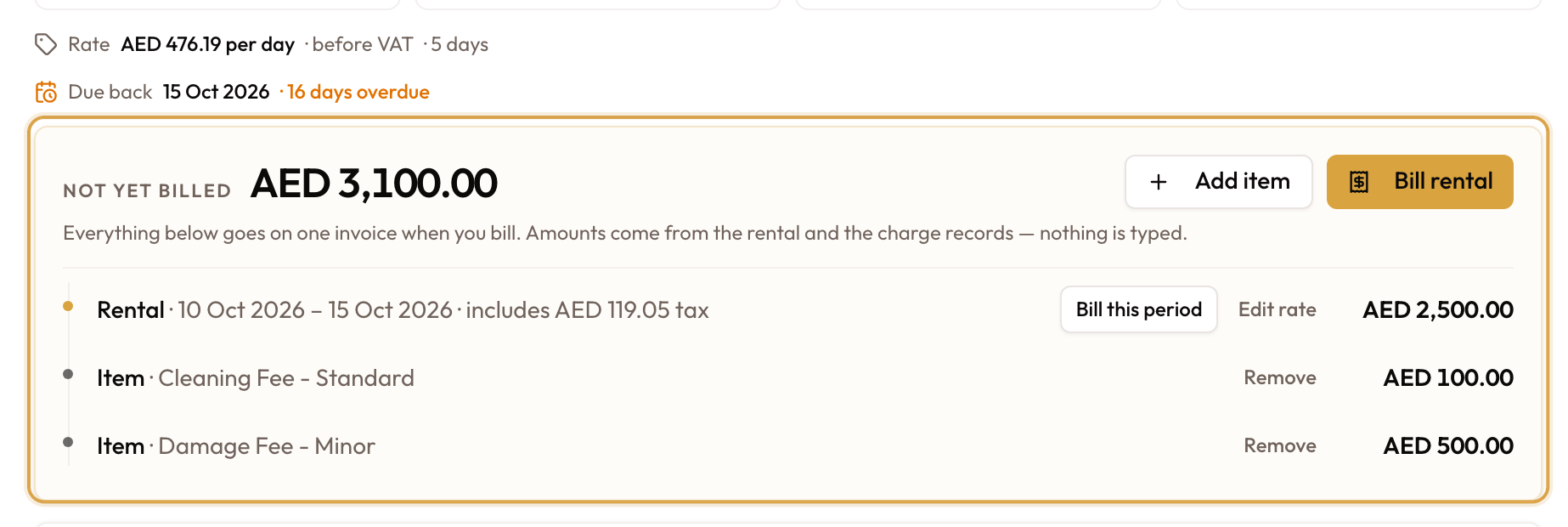
Open the agreement. At the top of the Overview tab, the Rental Account shows the Rate the rental is charged at and the Not yet billed card: "Everything below goes on one invoice when you bill."
Open Bill Rental
Click Bill rental. It shows only while something is unbilled.
To bill just the next period, click Bill this period on the first unbilled period instead. The same dialog opens with only that period ticked.

Choose what goes on the invoice
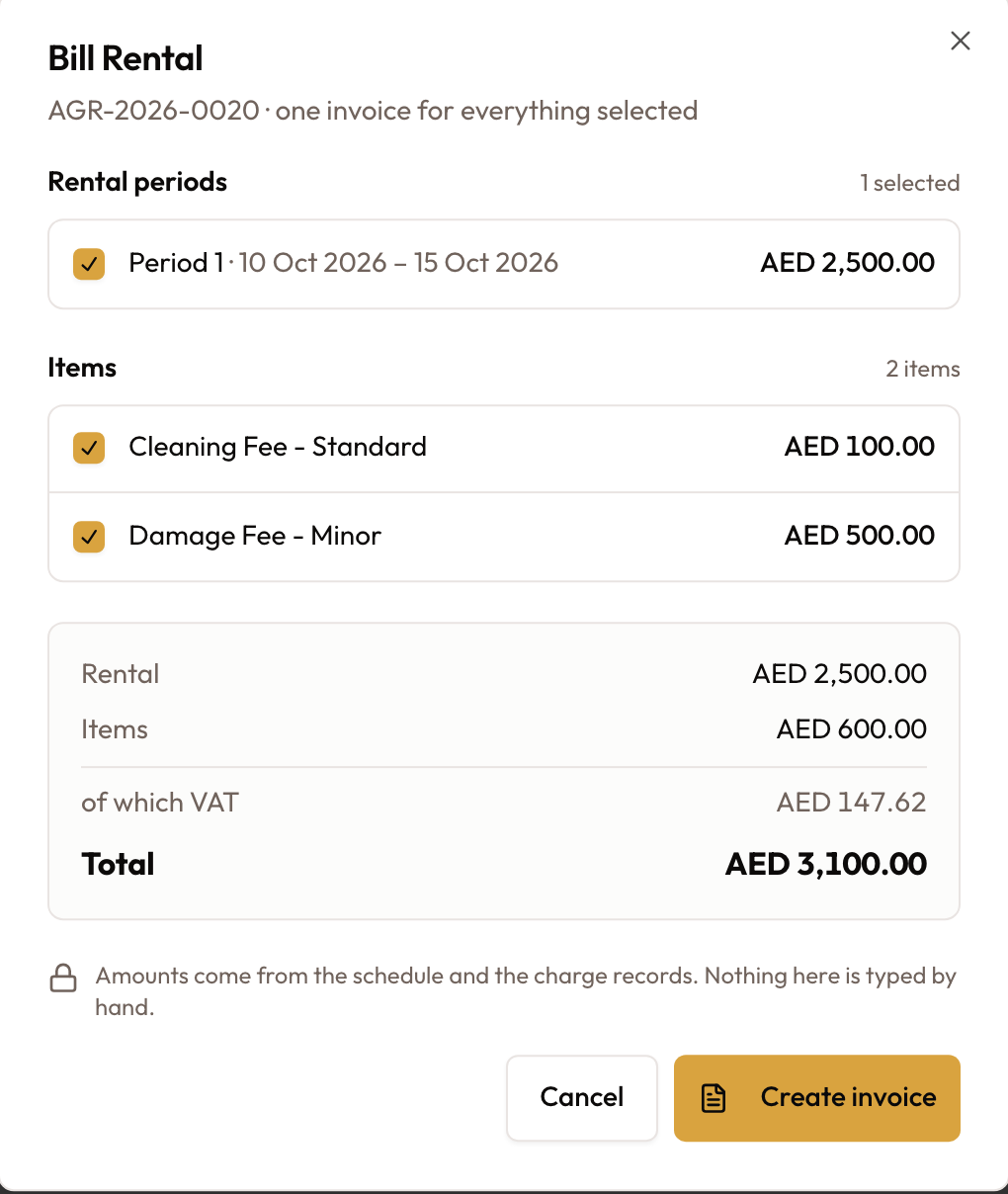
The Bill Rental dialog lists three sections, all ticked:
- Rental periods (an extension period is tagged EXT)
- Tolls & fines
- Items
Untick what waits for later
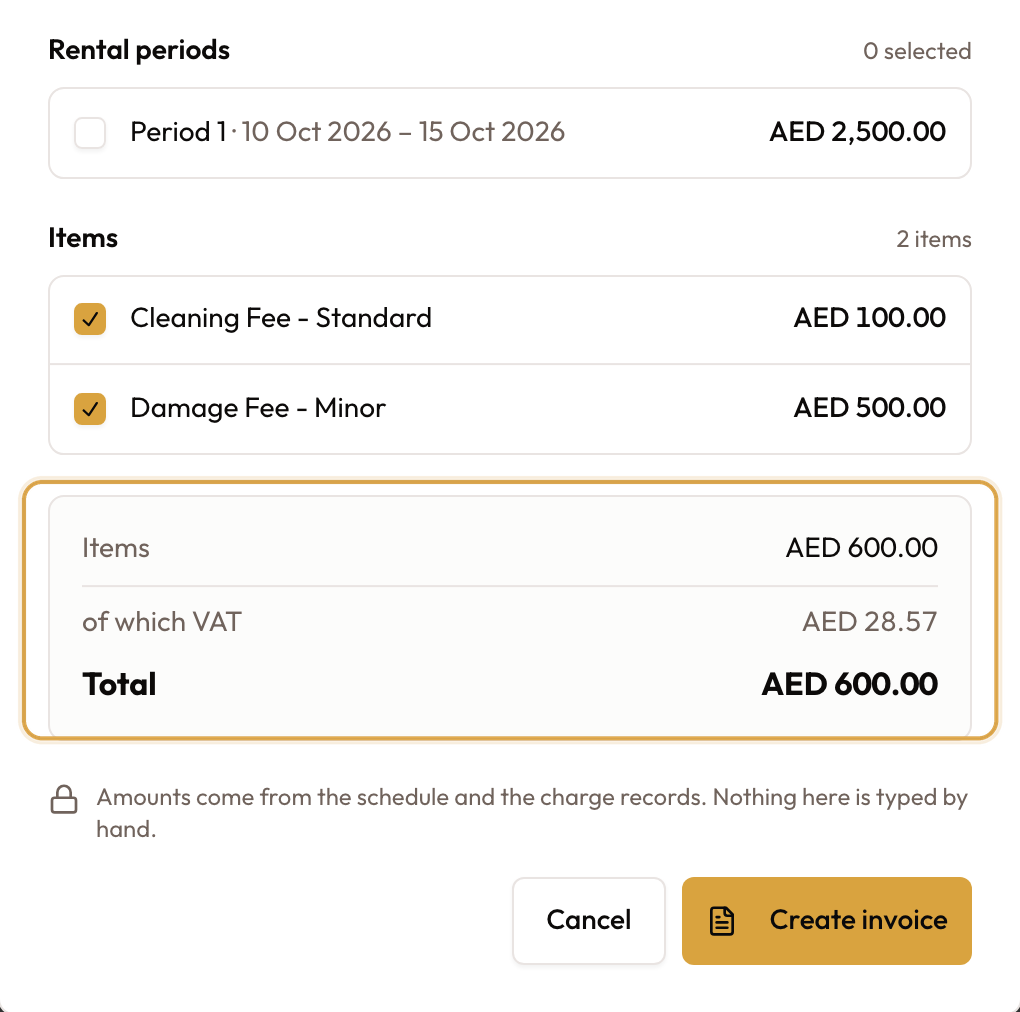
Untick anything you are not billing now. It stays unbilled for next time. A toll's processing fee follows its toll; it has no checkbox of its own.
The summary at the bottom shows the totals and of which VAT. Nothing in it is typed by hand.
Create the invoice
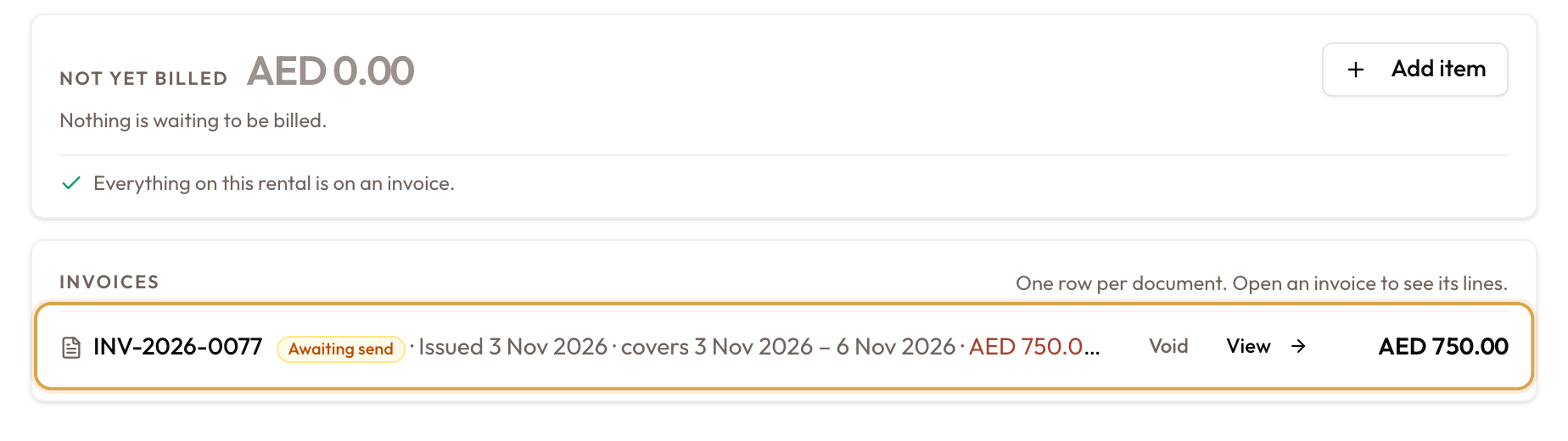
Click Create invoice. You see "Invoice … raised". Everything ticked goes on one invoice, finalised straight away at Awaiting Send and not emailed. It appears in the Rental Account's Invoices list.
Its type follows its contents: Scheduled when it includes a rental period, Addon when it only carries tolls, fines or items.
Periods bill in order. Keep a later period ticked while an earlier one is unticked and billing is refused. Untick from the last period backwards.
- Billing after close works. Bill rental works on active, expired, closed and terminated agreements, which helps when a fine lands after the return.
- Closing never bills on its own. Bill and close raises one invoice through this same path and then closes. Close without billing leaves everything in the Rental Account. See Closing an Agreement.
- Extensions. With Raise invoices automatically on, each extension bills its own period straight away. With it off, the period waits in Not yet billed.
Create an invoice yourself
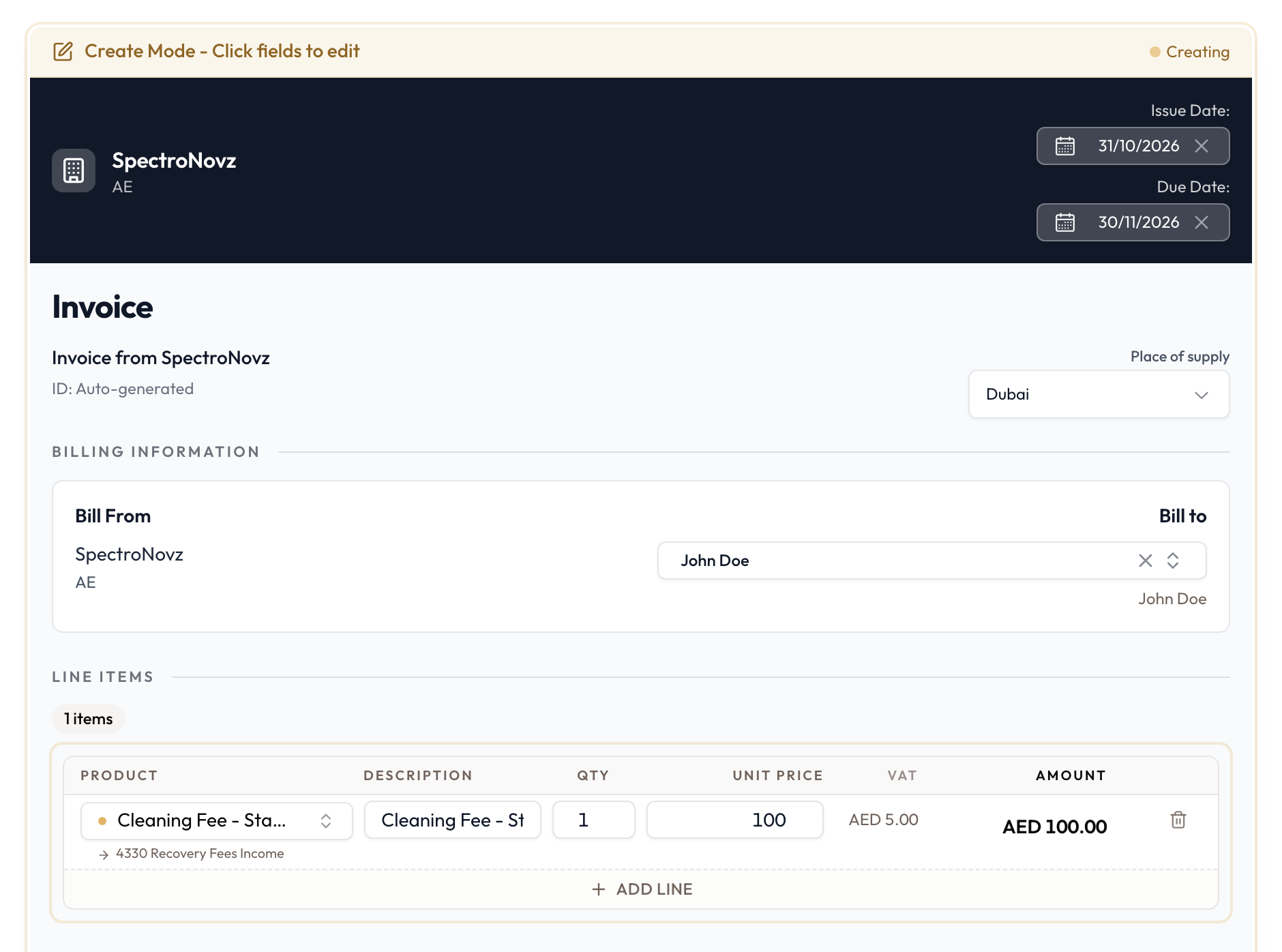
- Manual invoice: in the sidebar under Financial Management, click Invoices, then Create Invoice. Pick the customer, add lines from your product catalog and save. It starts as a Draft that you finalise and send. Creating Manual Invoices covers every field.
- Addon invoice: on an agreement, click Create Addon Invoice. The same page opens with the customer and agreement locked. It works on active, expired, closed and terminated agreements.
How an invoice moves
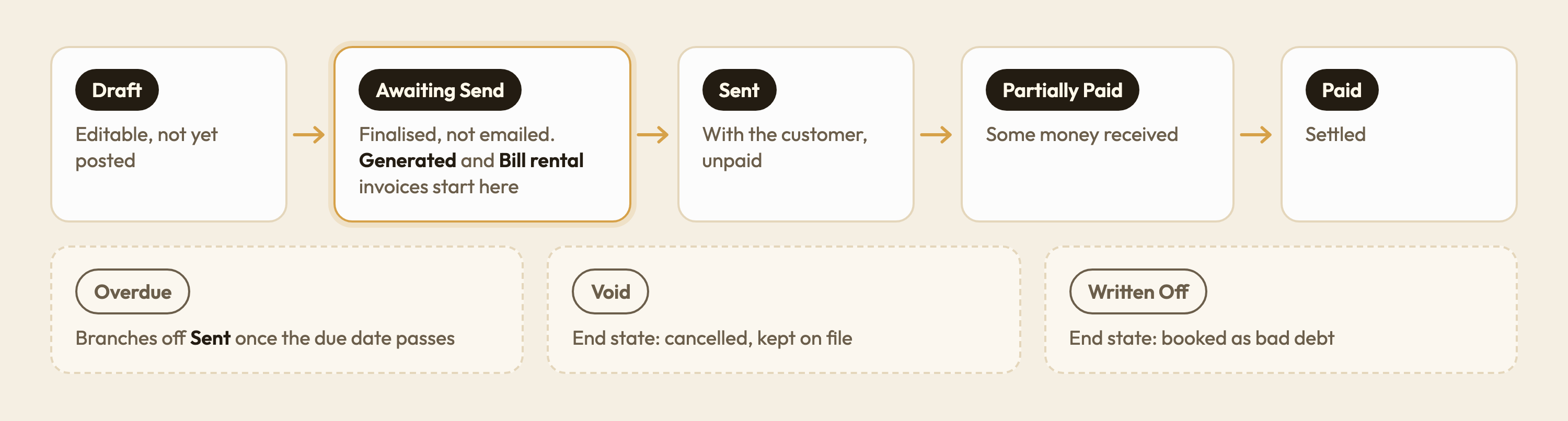
| Status | What it means | What you can do |
|---|---|---|
| Draft | Editable, not yet posted | Edit, finalise, void |
| Awaiting Send | Finalised but not emailed | Send, void |
| Sent | With the customer, unpaid | Record payment, void |
| Overdue | Past due, still owing | Send reminder, record payment, void |
| Partially Paid | Some money received | Record payment. Void is blocked |
| Paid | Settled | Void is blocked |
| Void | Cancelled, kept on file | Final |
| Written Off | Booked as bad debt | Final |
Invoices generated from a schedule or raised with Bill rental skip Draft. They start at Awaiting Send.
Once an invoice leaves Draft, its lines and amounts are locked. Editing is a draft-only action.
Voiding an invoice
With money on it: you can't
An invoice carrying a payment or an applied credit note will not void. The dialog reads Resolve the payment before voiding, names what is attached, and has no confirm button.
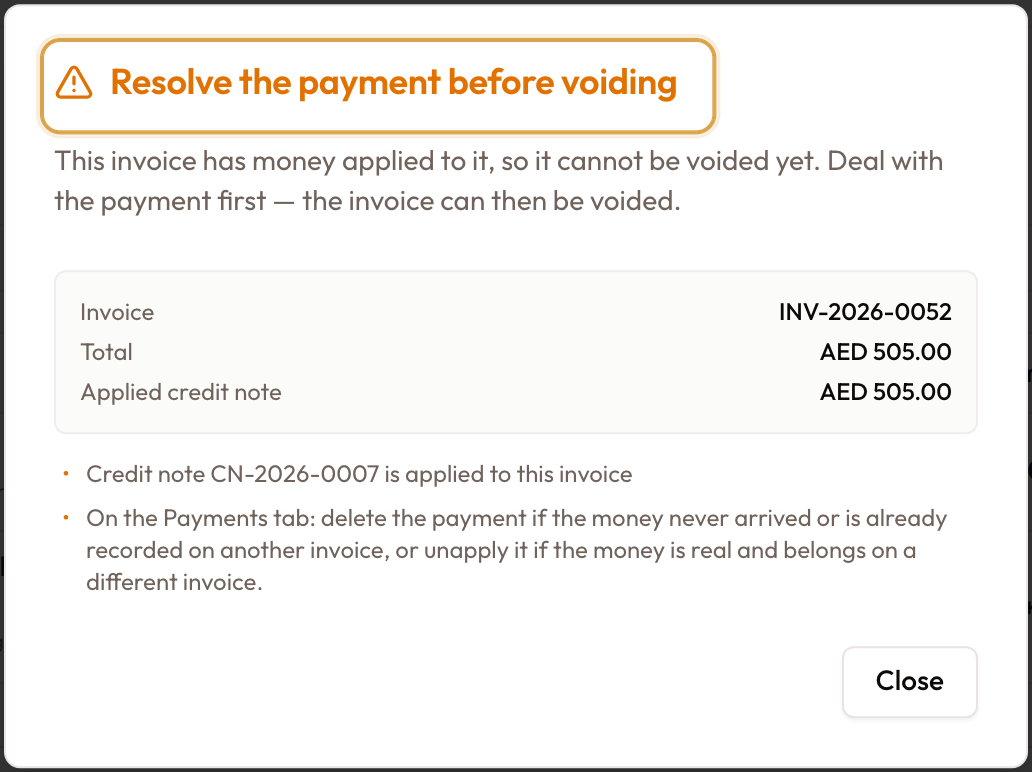
Clear it first on the invoice's Payments tab, from the row menu:
| Action | Use it when | What happens |
|---|---|---|
| Unapply | The money is real but belongs on a different invoice | The payment stays on the customer's account as unapplied cash (payment allocation) |
| Delete payment | The money never arrived, or is already recorded on another invoice | The receipt is removed. This cannot be undone. A reason is required |
Both need the payments permission. If the row menu is empty, you don't have it.
With nothing on it
The Void this invoice? dialog lists what happens:
- The invoice stops counting toward your receivables.
- The customer can no longer pay it.
- It cannot be undone. The invoice stays on file as a cancelled document.
Nothing it billed is lost. On an agreement's invoice, the rental periods, tolls, fines and hand-added items return to unbilled, ready to bill again. On a short-term rental they reappear under Not yet billed; on a monthly agreement the period is ungenerated on the payment schedule again.
If the customer won't pay a sent invoice, a write-off may fit better than a void. See Refunds & Write-Offs.
Void & Reissue on a short-term rental
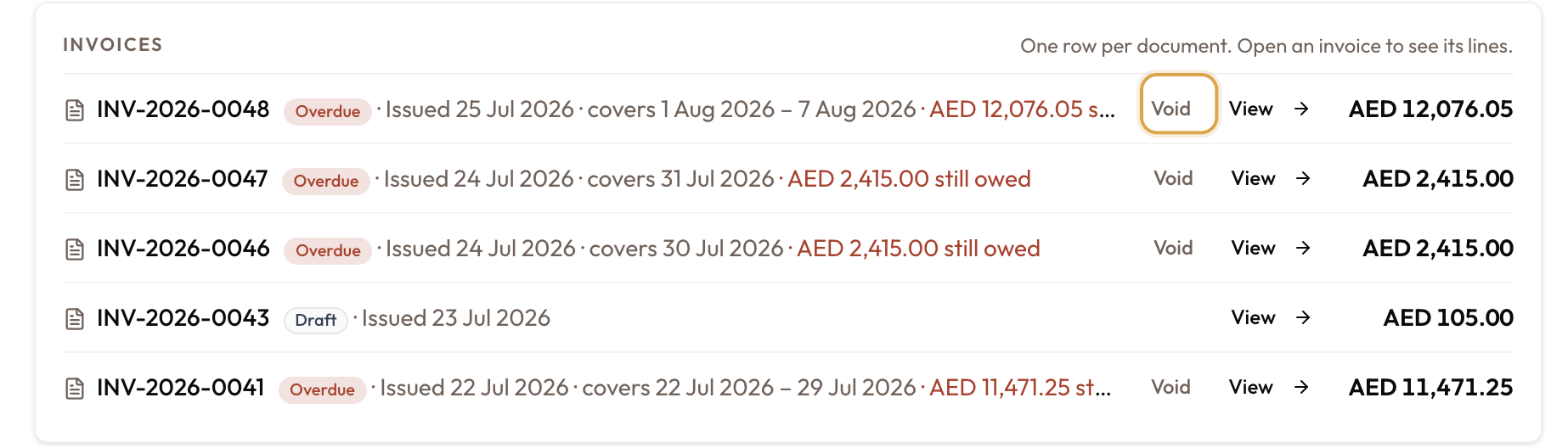
Click Void on the invoice
In the Rental Account's Invoices list, click Void on an unpaid or part-paid invoice. The Void & Reissue dialog opens.
If money is applied, the dialog will not void. It offers Issue a credit note (credit notes) or Unlink the payment first.
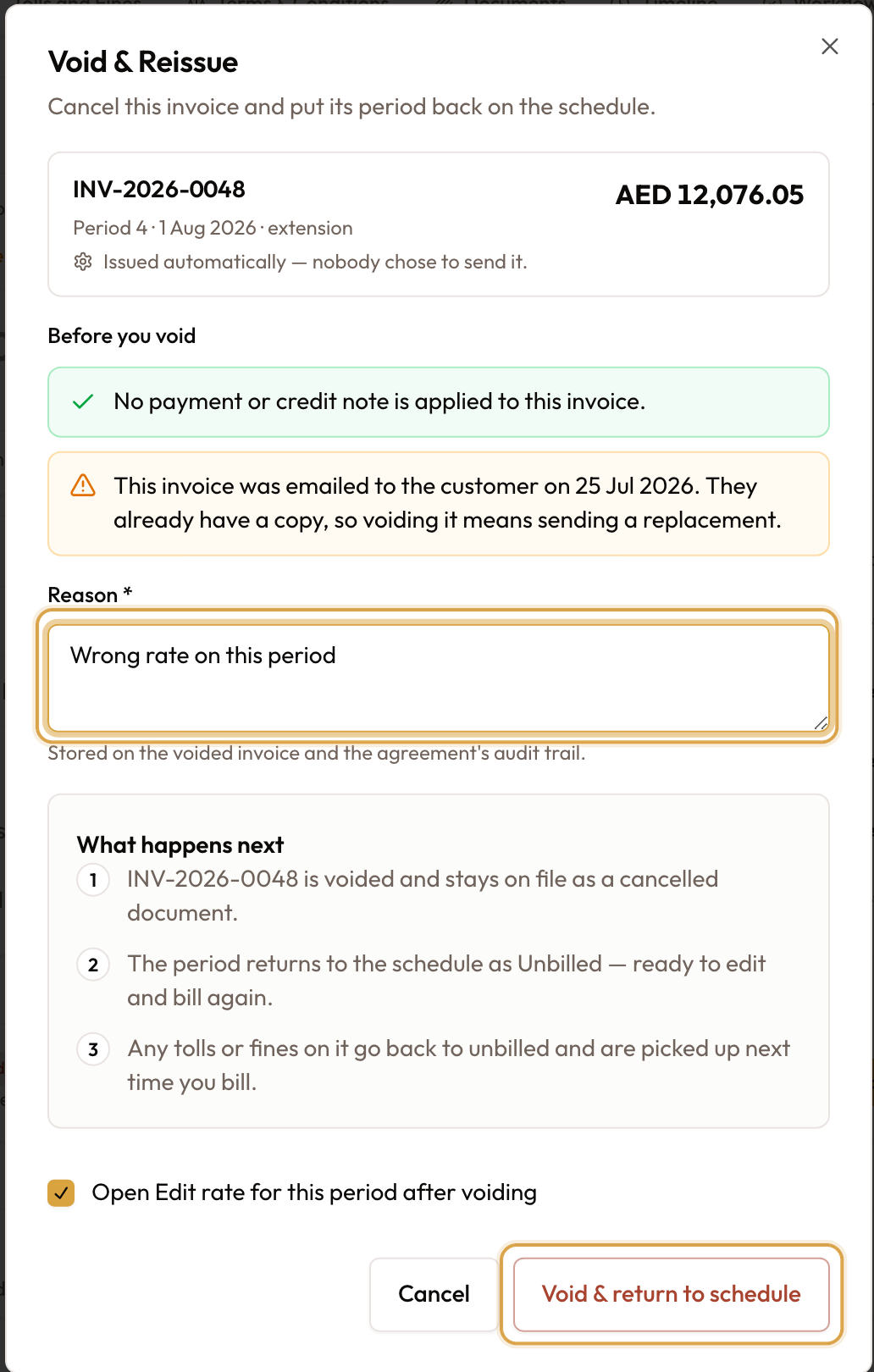
Give a reason and void
Enter a Reason and click Void & return to schedule. The invoice is voided and everything on it goes back to Not yet billed, ready to bill again.
When something looks wrong
| What you see | What it means |
|---|---|
| "Generate the previous payment first" | Schedule rows are raised in order. Generate the earlier one |
| No payment schedule on the agreement | It is a short-term rental. Bill it from the Rental Account with Bill rental |
| "Cannot bill: an earlier payment … has not been billed yet" | You unticked an earlier rental period but kept a later one. Untick from the last period backwards |
| An extension raised no invoice | Raise invoices automatically is off. The period was added unbilled; generate or bill it when ready |
| Closing raised no invoice | Closing never bills on its own. Use Bill and close, or bill afterwards |
| A vehicle swap raised no invoice | That's expected. A swap never raises its own invoice |
| The invoice cannot be edited | It has left Draft. Lines and amounts are locked from then on |
| "Resolve the payment before voiding" | Money is applied. Unapply or delete it on the Payments tab first |
| The Payments tab row menu is empty | You don't have the payments permission |
| Tax shows "Calculating…" and stays | Check that a place of supply is set and the lines have valid products |
| You cannot set the invoice number | Numbers are assigned on save, from your document numbering settings |
What to read next
Invoicing
How invoices come into being — automatically from an agreement's schedule, or raised by hand — and how they reach the customer.
Creating Manual Invoices
Raise a standalone invoice by hand: pick the customer, add line items with server-computed tax, apply a discount, and save it as an editable draft.