

Closing an Agreement
End a rental: check for late tolls and fines, bill what is left or leave it for later, free the vehicle, and keep the deposit until you release it.
Closing ends an agreement. It marks it closed, stops revenue for the months it will no longer serve, and produces the statement of account.
Closing raises no invoice of its own and never touches the deposit. Billing is a separate choice on the same screen: bill what is still unbilled as you close, or close now and bill later.
The same screen handles a short-term rental and a monthly agreement, and a full-term end and an early return.
Before you start
- The agreement is Expired, or Active with the vehicle already returned.
- The vehicle has been checked in. Until it is, the close screen shows "Vehicle check-in is required before this agreement can be closed." with a Do check-in link, and both close buttons stay disabled. See Vehicle Check-In & Return Inspection.
- To bill as you close, or to add an item, you also need permission to create invoices.
Closing
Open the close screen
When the agreement can be closed, a green banner sits above its tabs — "This agreement has reached its end date and is ready to be closed." or, for an early return, "Vehicle was returned ahead of the term end date. This agreement is ready to be closed early." Click Close Agreement.
The same action is in the sidebar under Workflow Actions. On an Active agreement it only appears once the vehicle has been checked in.
Check for new tolls & fines
The first panel, Check for new tolls & fines, is the same sync you use on the Tolls & Fines hub — one row for Salik tolls + RTA fines, and one for Sync Darb if you have a Darb account. Click Pull now on each.
Fines can arrive up to two weeks after the return, so pull before you decide what to bill. Anything new for this agreement drops into the list below.
Syncing runs in the SpectroNova Express desktop app. In a browser the panel says so and Pull now is disabled. It never blocks the close.
Review what is not billed yet
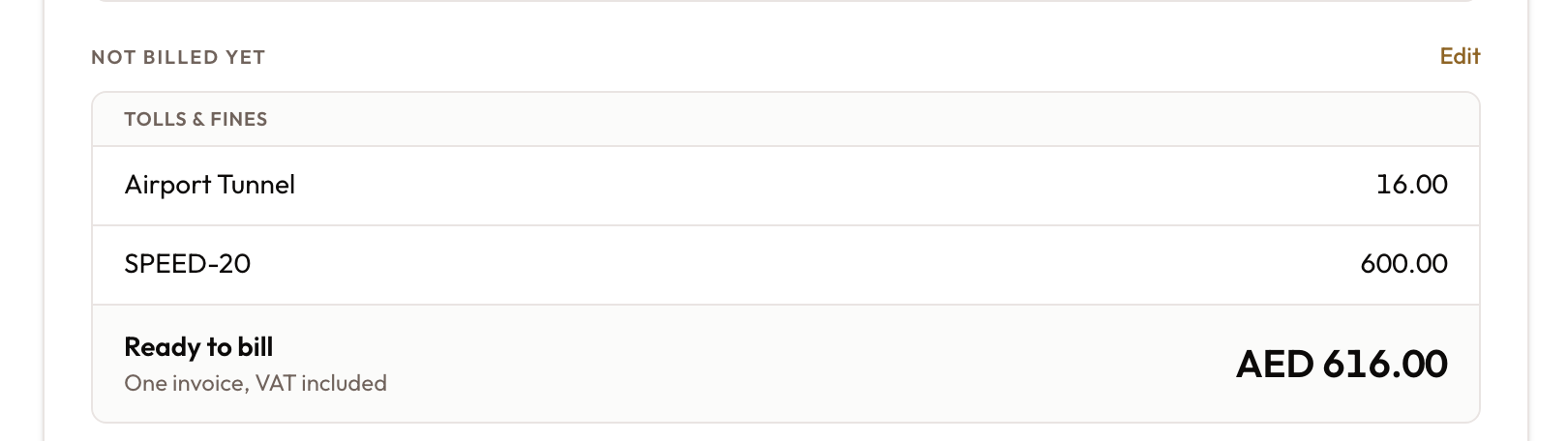
Not billed yet lists everything on the agreement that is not on an invoice yet, grouped under Rental (each unbilled period), Items (damage, cleaning, fuel and anything else added for this rental) and Tolls & fines.
The list is read-only. The footer shows the Ready to bill total — "One invoice, VAT included". When nothing is waiting it reads "Nothing left to bill."
Leave something off the invoice
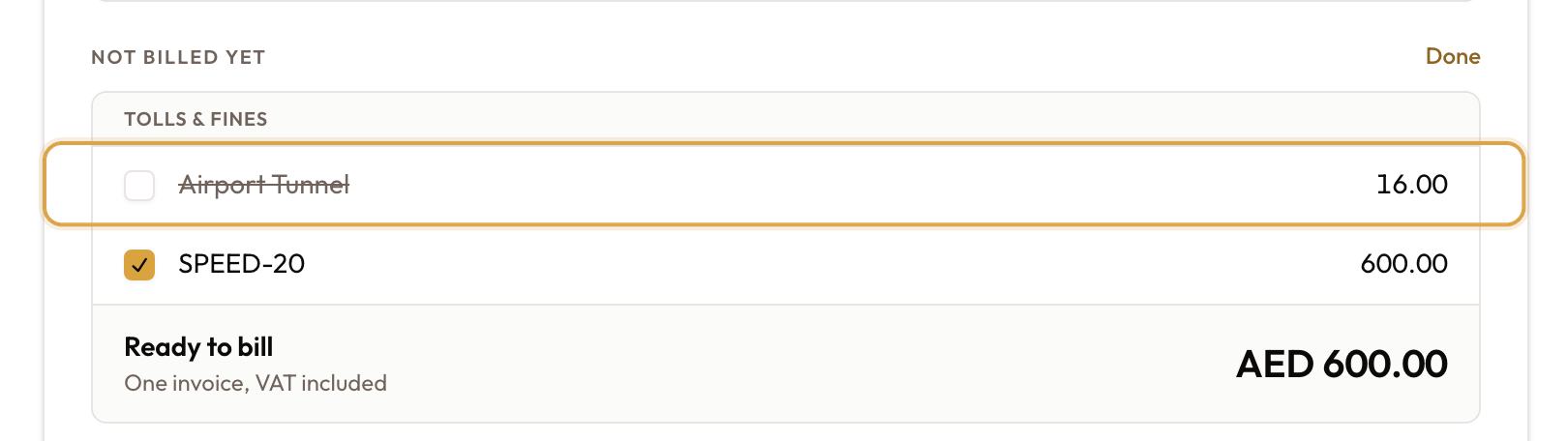
Click Edit. Every row gets a checkbox, all ticked. Untick anything you are not charging now — it is struck through and Ready to bill drops. Click Done when you are finished.
Unticking only leaves a row off this invoice. It stays unbilled and can be billed later. A processing fee has no checkbox of its own — it follows its toll.
Untick rental periods from the last one backwards. Periods bill in order. Keep a later period ticked while an earlier one is unticked and billing is refused — "Cannot bill: an earlier payment (#n) has not been billed yet." — and the agreement stays open.
Add an item (optional)
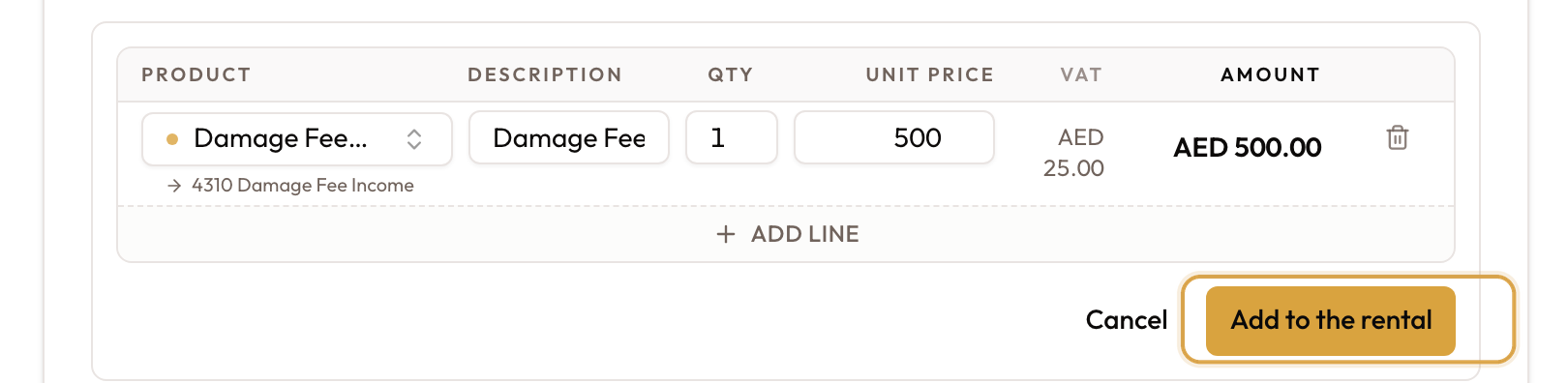
Damage found at the counter, a cleaning fee, a fuel top-up: click Add an item. An editor opens under the list with one row — pick the product, check the description, and enter the quantity and the price the customer pays, VAT included. Add line adds another row. Click Add to the rental.
The items join the list under Items, and Edit mode opens so a mistyped one can be removed straight away with its bin icon. Adding Damage & Extra Charges to a Rental covers the editor in detail.
Check what closing will do
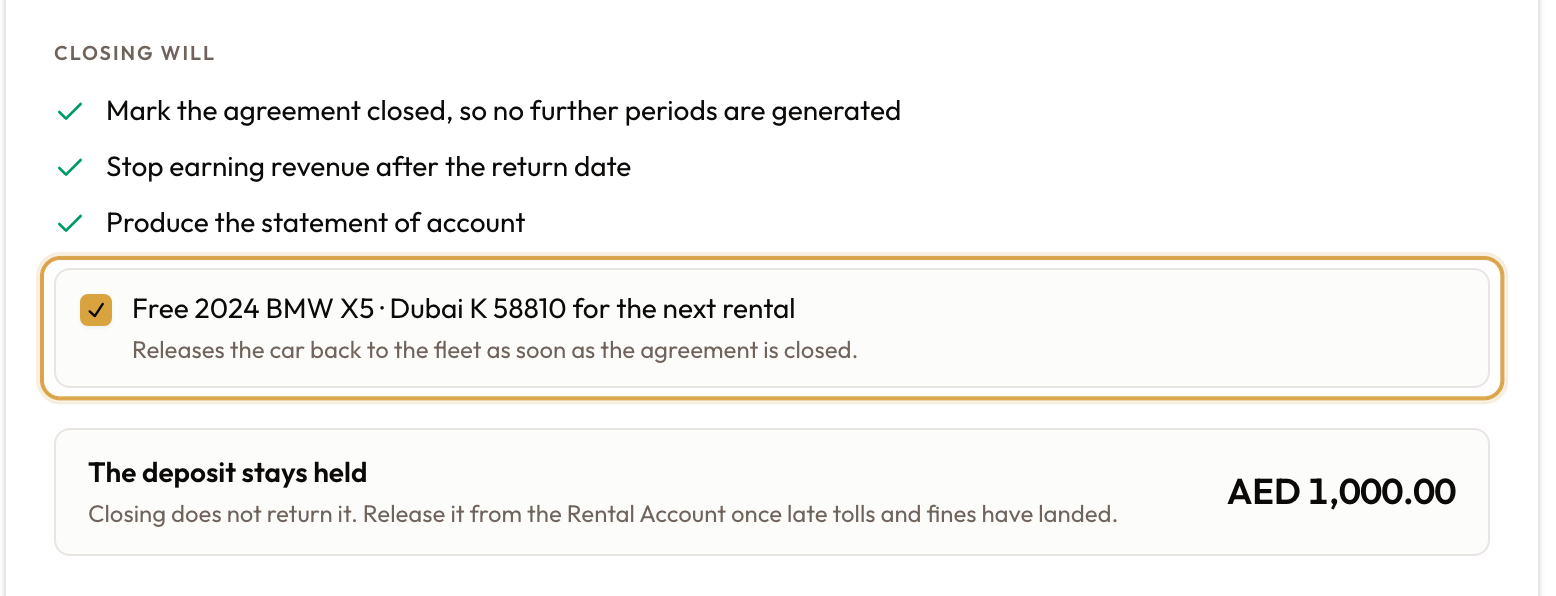
Closing will lists what happens every time:
- Mark the agreement closed, so no further periods are generated
- Stop earning revenue after the return date
- Produce the statement of account
If there is a vehicle, a checkbox follows, ticked by default: Free {vehicle} for the next rental. Leave it ticked and the vehicle goes back to the fleet as soon as the agreement is closed. Untick it to keep the vehicle held; release it later with Release Vehicle in the closed agreement's sidebar. Until then, the agreement page, the vehicle page and the fleet calendar show Not released yet with the return date and a Release button.
The deposit stays held
If the agreement carries a deposit, The deposit stays held shows the amount. Closing never returns, applies or refunds it.
Release it yourself once late tolls and fines have landed: on the agreement's Overview tab, the Security Deposit card has a Release deposit button. See Release the deposit.
The hint on this box says to release the deposit "from the Rental Account". The button is on the Security Deposit card. The box also appears for a waived or pre-authorised deposit — check the card for the real position.
Add closing notes (optional)
Closing notes are added to the agreement's internal notes, stamped with the close time.
Bill and close, or close without billing
| Button | When it shows | What it does |
|---|---|---|
| Bill and close | Something is ticked in Not billed yet | Raises one invoice for the ticked rows, then closes |
| Close Agreement | Nothing is unbilled, or you unticked everything | Closes. Nothing is billed |
| Close without billing | Anything is unbilled | Closes and leaves everything unbilled, to bill later |
On a short-term rental, billing later is fully supported. The closed agreement's Rental Account still lists what is unbilled, and Bill rental still works there — useful when you are waiting for a late fine.
On a monthly agreement or lease, billing later goes through the Payment Schedule. Once the agreement is closed, its first unbilled period shows Bill, which opens Bill Rental with that period ticked. Periods are billed in order. For a charge that isn't a rental period, use Create Addon Invoice; see Creating Manual Invoices.
Confirm
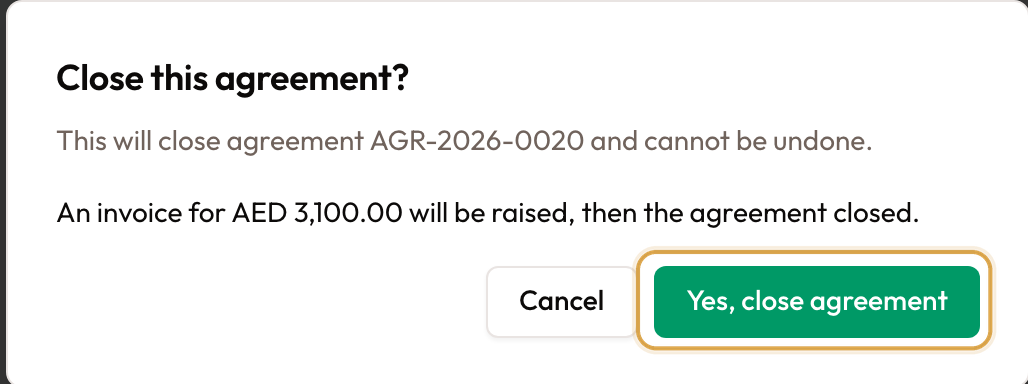
Close this agreement? names the agreement and warns that the close cannot be undone. It adds one line — either the amount that will be invoiced, or the amount that will stay unbilled. Click Yes, close agreement.
With Bill and close you see "Invoice … raised" and then "Agreement closed", and you are back on the agreement, now Closed.
Billing and closing happen one after the other. If billing fails, nothing is closed and you see why. If billing works but the close fails, the invoice stands and you can close again.
What happens after the close
- The agreement is Closed and no further periods are generated.
- Revenue still deferred over the rest of the term stops being deferred.
- A statement of account PDF is produced and saved against the agreement. It is not emailed to the customer. See Statement of Account.
- Tolls are re-matched against the actual return date, so tolls after the return are no longer assigned to this customer.
- A deposit invoice that was never paid is voided — there is nothing to return.
- The deposit itself is untouched until you release it.
- If Free {vehicle} for the next rental was ticked, the vehicle is available for the next rental. If that part fails, the close still stands and a message tells you to release the vehicle from the agreement.
When something looks wrong
| What you see | What it means |
|---|---|
| Both close buttons are disabled | The vehicle has not been checked in |
| No green banner on an Active agreement | An early close needs the return recorded first — do the check-in |
| Pull now is disabled | You are in a browser. Syncing runs in the desktop app |
| You expected a refund at close | Closing never moves the deposit. Use Release deposit on the Security Deposit card |
| "Cannot bill: an earlier payment … has not been billed yet" | You unticked an earlier rental period but kept a later one. Untick from the last period backwards |
| Closing a lease early lists months after the return | Every remaining unbilled period is listed and ticked. Use Edit to untick the months the customer is not paying for |
| A fine arrives after a short-term rental was closed | Sync it, then bill it from the Rental Account with Bill rental |
| A monthly agreement was closed without billing | Use Bill on the first unbilled period of the Payment Schedule |
| The vehicle still shows as rented | The Free … for the next rental box was unticked, or the release failed. Use Release Vehicle in the sidebar |
| "Failed to close agreement" | The close did not go through. The agreement is still open |
What to read next
- Adding Damage & Extra Charges to a Rental — the items you can add here, and on the Rental Account
- Vehicle Check-In & Return Inspection — the step that has to happen before this one
- Viewing Agreement Details & Timeline — the Security Deposit card and Release deposit
- Billing Tolls, Fines & Parking to Customers — billing tolls and fines that arrive after the close
Vehicle Check-In & Return Inspection
Record the vehicle coming back — inspection, condition, non-rental time, signature and return time. Closing happens afterwards.
Adding Damage & Extra Charges to a Rental
Turn damage, cleaning, fuel and other extras into billable items — on the Rental Account or the Close screen — and bill them, before or after the close.