

Security Deposits
How a rental's deposit is set, invoiced at checkout, collected, held after close and released, plus how to correct it or add one later.
A security deposit is money the customer leaves with you for the length of a rental. In SpectroNova Express it follows the same path on every agreement:
- Set when the agreement is created: invoiced, held on your POS, or waived.
- Invoiced the moment checkout is completed.
- Collected by recording the customer's payment on that invoice.
- Held while the rental runs, and after it closes.
- Released when you decide, with a refund that writes its own credit note.
Everything after step 1 happens on the agreement's Security Deposit card, on the Overview tab of the agreement detail page.
Closing an agreement never moves the deposit. It stays held after close, because tolls and fines can still arrive. You release it yourself, from the card, when you are ready.
Before you start
- To release a deposit, your role needs permission to issue refunds.
- To correct a deposit or add one later, your role needs permission to update agreements, and the agreement must be Active or Expired.
- To hold a deposit on your POS (Pre-Auth), the customer needs a pre-authorization on file in their customer record.
Choose how the deposit is taken
On the Terms step of the Create Agreement wizard, pick a Deposit Method:
| Method | What happens |
|---|---|
| Invoice | The default. A security deposit invoice is raised at checkout for the Security Deposit Amount (AED). |
| Pre-Auth | The deposit is held on your own POS terminal. SpectroNova Express records it but raises no deposit invoice. |
| Waived | "No security deposit will be invoiced or collected." |
With Invoice, a suggested amount is filled in from your Agreement Settings. Change it if this rental needs a different deposit.
Pre-Auth can only be picked when the customer has a pre-authorization on file. The wizard then shows Customer has pre-authorization on file, and warns Pre-auth expires before agreement end: when it runs out before the rental does.
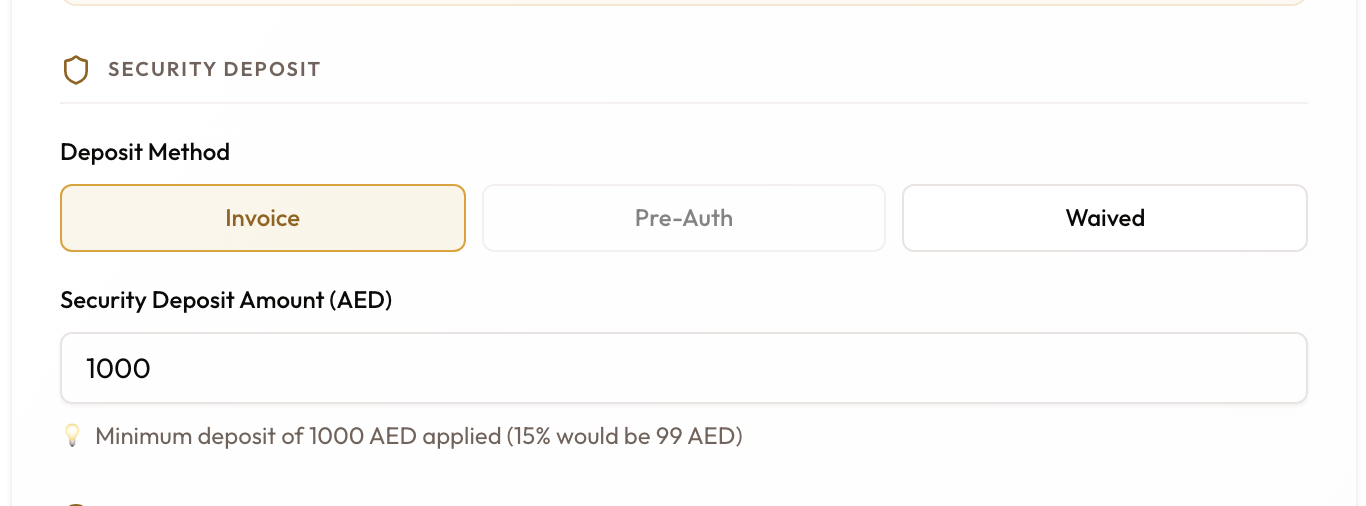
Express Rental offers the same three choices on its own terms step.
When the deposit invoice is raised
When you click Complete Checkout, SpectroNova Express raises the deposit invoice straight away:
- It is finalised at once, so it opens at Awaiting Send.
- It falls due on the same day as the rental's first payment.
- It carries no VAT, because a refundable deposit is not a sale.
- It is raised whether or not your workspace raises rental invoices automatically.
Agreements with a Pre-Auth or Waived deposit get no deposit invoice.
Read the Security Deposit card
The card tells you where the deposit stands, and offers only the actions that fit.
| The card shows | It means | Actions |
|---|---|---|
| Waived | No deposit on this rental | None |
| Pre-Auth, with the reference and expiry | "Held externally on your POS. No deposit invoice was generated." | None |
| None agreed | The method is Invoice, but the amount was 0 | Add deposit |
| Not invoiced, with the amount | Agreed, but no invoice was ever raised | Raise deposit invoice |
| An invoice status such as Awaiting Send, Overdue or Partially Paid | The deposit invoice is open. A part-paid deposit shows what is left, with of the full amount beneath | Collect, Correct deposit |
| Paid and Refundable | You hold the whole deposit | View, Release deposit. Correct deposit shows greyed out |
| Paid and Partially released | Part has gone back: "… of … still held" | View, Release deposit |
| Paid and Released | All of it is back with the customer: Returned to customer | View |
| Void | The deposit invoice was cancelled | View, Re-issue deposit |
Collect the deposit
Open the deposit invoice
On the card, click Collect. The deposit invoice opens.
Send it and record the payment
From the invoice sidebar:
- Send to Customer emails it. See Sending Invoices.
- Record Payment logs what the customer paid. See Recording Payments.
A part-payment leaves the card open, showing what is still owed.
Check the card
Once the invoice is paid in full, the card shows Paid and Refundable, and Collect becomes View. The deposit is now held.
Hold the deposit after the rental ends
The deposit stays held through check-in and close. When you close the agreement, a box headed The deposit stays held shows the amount. Nothing is refunded or applied to the final bill.
Hold it until late tolls, fines and damage charges have landed, then release what is due back.
Release the deposit
Open the deposit card
Open the agreement. On the Overview tab, the Security Deposit card shows Release deposit once the deposit invoice is paid and something is still held.
Enter the refund
Click Release deposit. The Issue Refund dialog opens. It explains that it "writes a credit note and the refund together", and shows Available to refund first. Then fill in:
- Refund amount: up to the amount available. Enter less to release part of the deposit and keep the rest.
- How the money goes back: Cash (the default), Bank transfer, Cheque or Card reversal.
- Refund date: dates both the credit note and the refund.
- Has the money gone back yet?: Yes, already returned (the default) or No, queue it for transfer.
- Reference (optional) and Notes (optional).
Click Issue refund.
Check the result
You'll see Refund issued. A credit note with the Deposit refund reason and its refund are created together, and both appear in the agreement's Credits & refunds card.
The deposit card now shows Released, or Partially released with what is still held. Release deposit stays available until nothing is held.
Queued the refund for transfer? It stays pending, and the amount stays reserved, until you open the refund and click Mark completed. See Creating Credit Notes & Deposit Refunds.
Correct a deposit that was keyed wrong
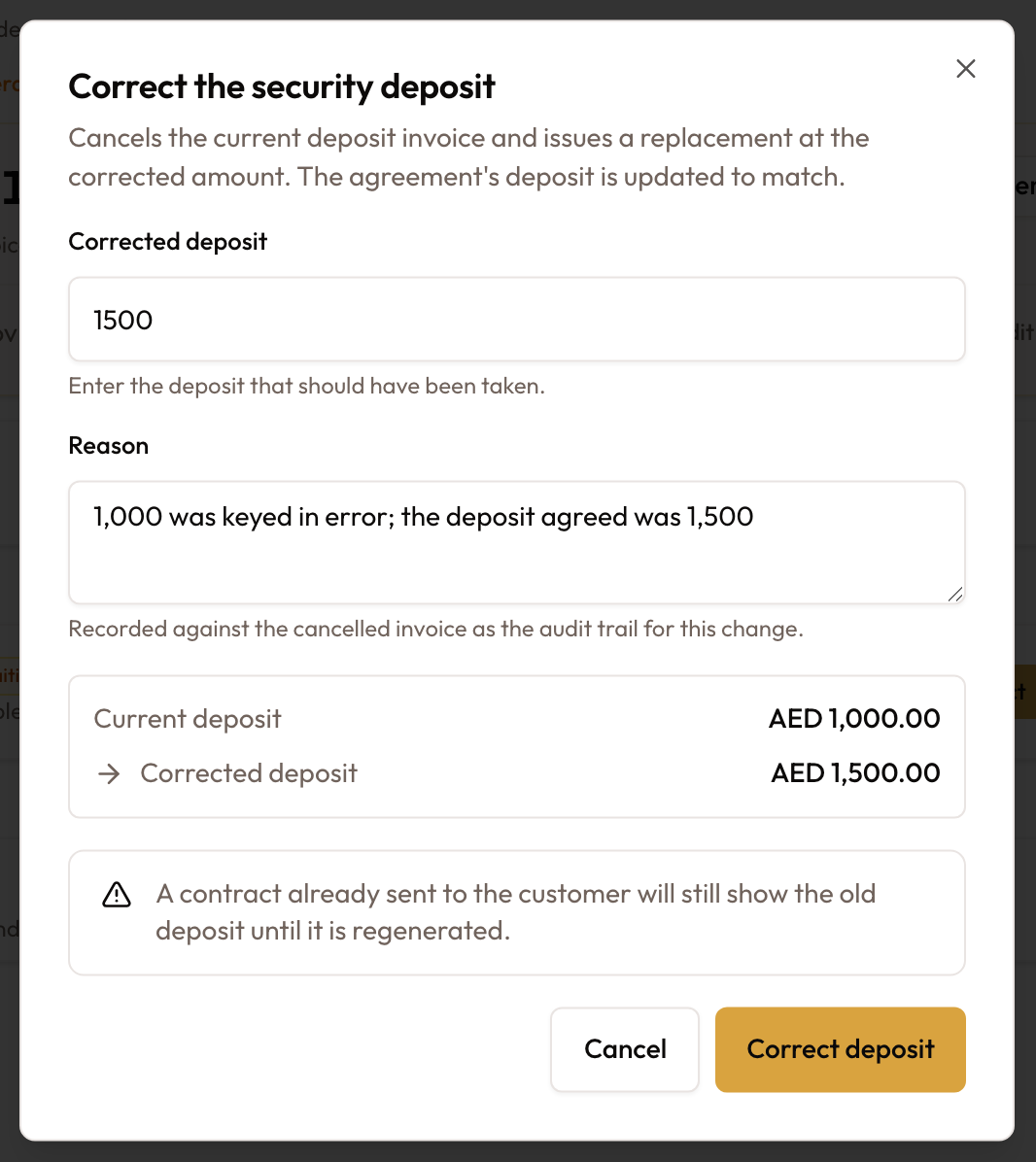
When the wrong deposit was entered, Correct deposit fixes the invoice and the agreement in one pass: it cancels the deposit invoice, raises a replacement at the right amount, and updates the agreement's deposit to match.
Open the correction
On the card, click Correct deposit. If the deposit invoice was already voided, the button reads Re-issue deposit instead: nothing is cancelled, and a new invoice is raised.

Enter the amount and a reason
In Correct the security deposit:
- Corrected deposit starts at the current figure. Enter what should have been taken.
- Reason is required, for example "e.g. 1,500 was keyed in error". It is recorded against the cancelled invoice.
A summary shows Current deposit against Corrected deposit.
Confirm
Click Correct deposit. You'll see Deposit corrected, and the card shows the replacement invoice. It keeps the original due date.
A contract already sent still shows the old figure. "A contract already sent to the customer will still show the old deposit until it is regenerated." Correcting to 0 cancels the invoice and leaves the agreement with no deposit.
What happens when you confirm
- The old invoice is voided, not edited. Your reason is recorded against it.
- The agreement's deposit term moves too, so the old figure never comes back the next time an invoice is generated.
- The replacement is the same kind of invoice, finalised at once, so it opens just as it would at checkout.
- The replacement keeps the original due date. An overdue deposit stays overdue.
- Correcting to 0 raises nothing. The invoice is cancelled and the agreement is left with no deposit.
When it will not let you
| What you see | What it means | What to do |
|---|---|---|
| Correct deposit is greyed out, and hovering it shows "A payment is recorded against this deposit. Unapply or delete it first, then correct the deposit." | Money has been collected on the deposit invoice | Unapply or delete the payment, then try again |
| "Cannot correct deposit: a credit note is applied to it. Unapply the credit note first." | A credit note sits against the invoice | Unapply the credit note first |
| "… is still a draft. Edit or delete that draft instead — nothing has been issued to correct." | A draft deposit invoice exists alongside a voided one | Edit or delete the draft |
| The button is missing | The deposit invoice was written off, the deposit is Waived or Pre-Auth, or your role can't update agreements | A written-off deposit can't be corrected |
| The agreement is Closed | Corrections run on Active and Expired agreements | If money is owed back, use Release deposit |
| The confirm button won't enable | The amount still equals the current deposit, or Reason is empty | Change both |
Add a deposit later
A card showing None agreed or Not invoiced offers Add deposit or Raise deposit invoice. Both open Add a security deposit: "Enter the amount and an invoice is raised for it, with the agreement updated to match."
Enter the amount and a reason
Type the Deposit amount, "What the customer is being asked to leave as a deposit.", and a Reason.
Confirm
Click Add deposit. The card shows the new deposit invoice, ready to collect.
Common mistakes & edge cases
| What you see | Why | What to do |
|---|---|---|
| No deposit invoice after checkout | The deposit method is Pre-Auth or Waived, or the amount was 0 | For an amount of 0, use Add deposit on the card |
| Pre-Auth is greyed out in the wizard | The customer has no pre-authorization on file, or it has expired | Record the pre-authorization on the customer, or choose Invoice |
| Release deposit is greyed out or missing | The deposit invoice isn't paid yet, nothing is still held, or your role can't issue refunds | Collect it first, or ask an admin |
| The deposit is still held after closing | Expected: closing never moves the deposit | Use Release deposit when you are ready |
| Add deposit or Raise deposit invoice is missing | The agreement isn't Active or Expired, or your role can't update agreements | Complete checkout first, or ask an admin |
| The refund shows as pending | No, queue it for transfer was picked | Open the refund and click Mark completed once the money has gone |
What to read next
Closing an Agreement
Ending the rental while the deposit stays held.
Creating Credit Notes & Deposit Refunds
The credit note a deposit release writes, and how to complete a queued refund.
Recording Payments
Logging the customer's deposit payment on the invoice.
Agreement Settings
The default deposit the wizard suggests.
The Rental Account & Bill Rental
The money view of a short-term rental: what is billed and not yet billed, adding items, Bill rental, Edit rate, Void & Reissue, and billing after the close.
Modifying an Active Agreement
What you can change once an agreement is running, where each change lives, and why an action you expected is missing.